
Advanced Ask Albert Workflows
Ask Albert works well out of the box for simple lookups. This article covers patterns that unlock significantly more from it — multi-step conversations, cross-data workflows, data quality checks, and recommendation-grade queries. All examples are drawn from real usage.
Before you start: the reasoning block is your co-pilot
Every Ask Albert response includes an expandable section that shows exactly what happened before the answer appeared — which databases were searched, how the intent was interpreted, and how many records were examined.
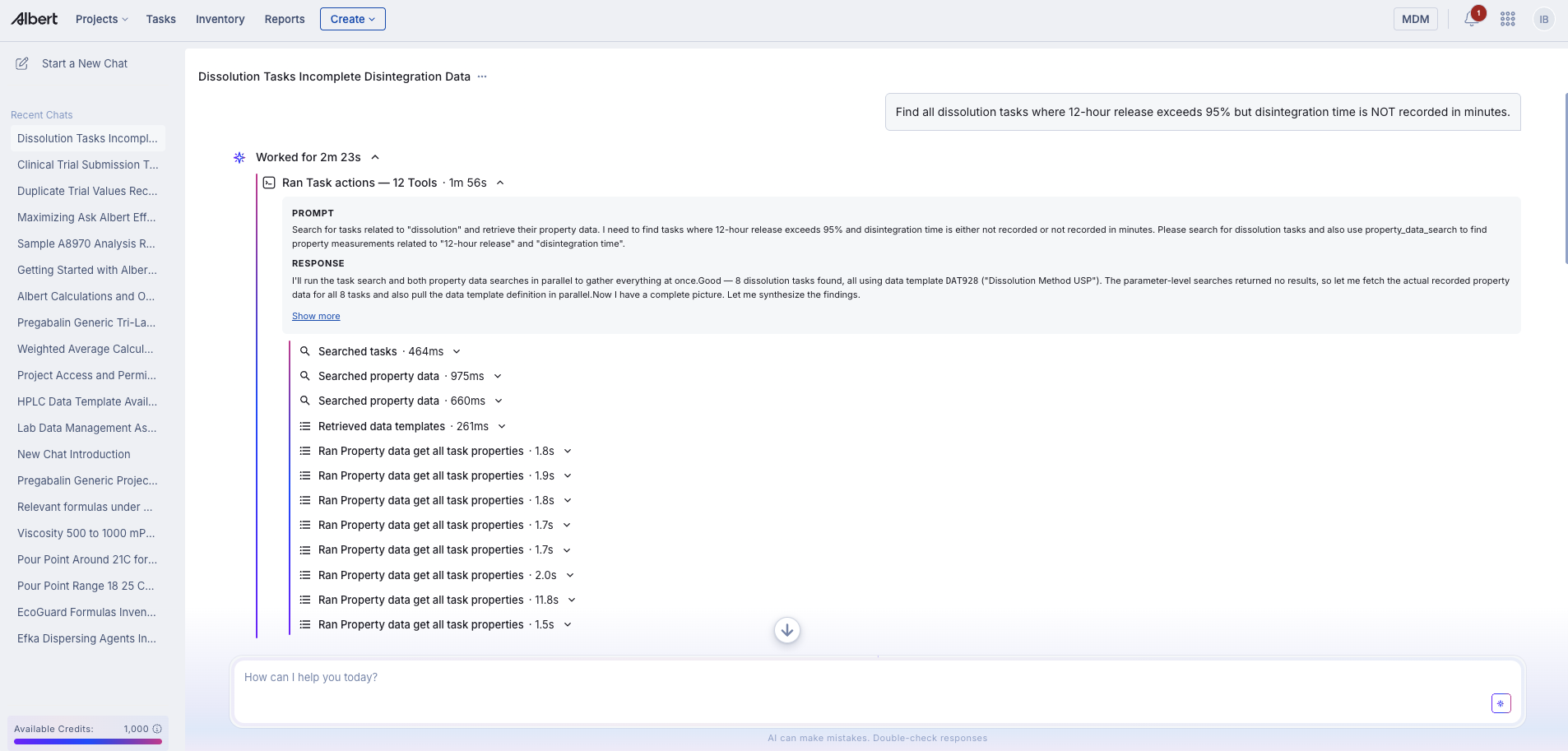
For advanced workflows, always expand this block. If a response looks wrong, the reasoning block will usually tell you why within seconds — wrong database searched, intent misread, or too few records found. This is faster than rephrasing blindly.
1. Multi-step conversations
Ask Albert holds context within a conversation. The most powerful workflows are sequences — each question builds on the previous answer rather than starting from scratch.
Pattern: Start broad, then constrain
Step 1 — Surface the landscape
"What tri-layer tablet formulations do we have in the Pregabalin Generic project?"

Step 2 — Narrow to a characteristic
"Which of these have completed dissolution data across all timepoints?"

Step 3 — Drill into the specific question
"For TL2 Gen 3, what does the 0.25-hour burst release look like compared to the monolith series?"
Why this works better than a single complex question: Ask Albert searches the top 100 most relevant records per query. A broad first question surfaces the right pool; follow-up questions refine within it. A single over-specified question may constrain too early and miss relevant records.
Practical rule: If your question has more than two conditions, break it into a sequence.
2. Cross-data type workflows
Ask Albert searches across Notebooks, Raw Materials, Formulas, and Property Data simultaneously. The most valuable queries are ones that connect these sources.
Pattern: Batch record + dissolution profile
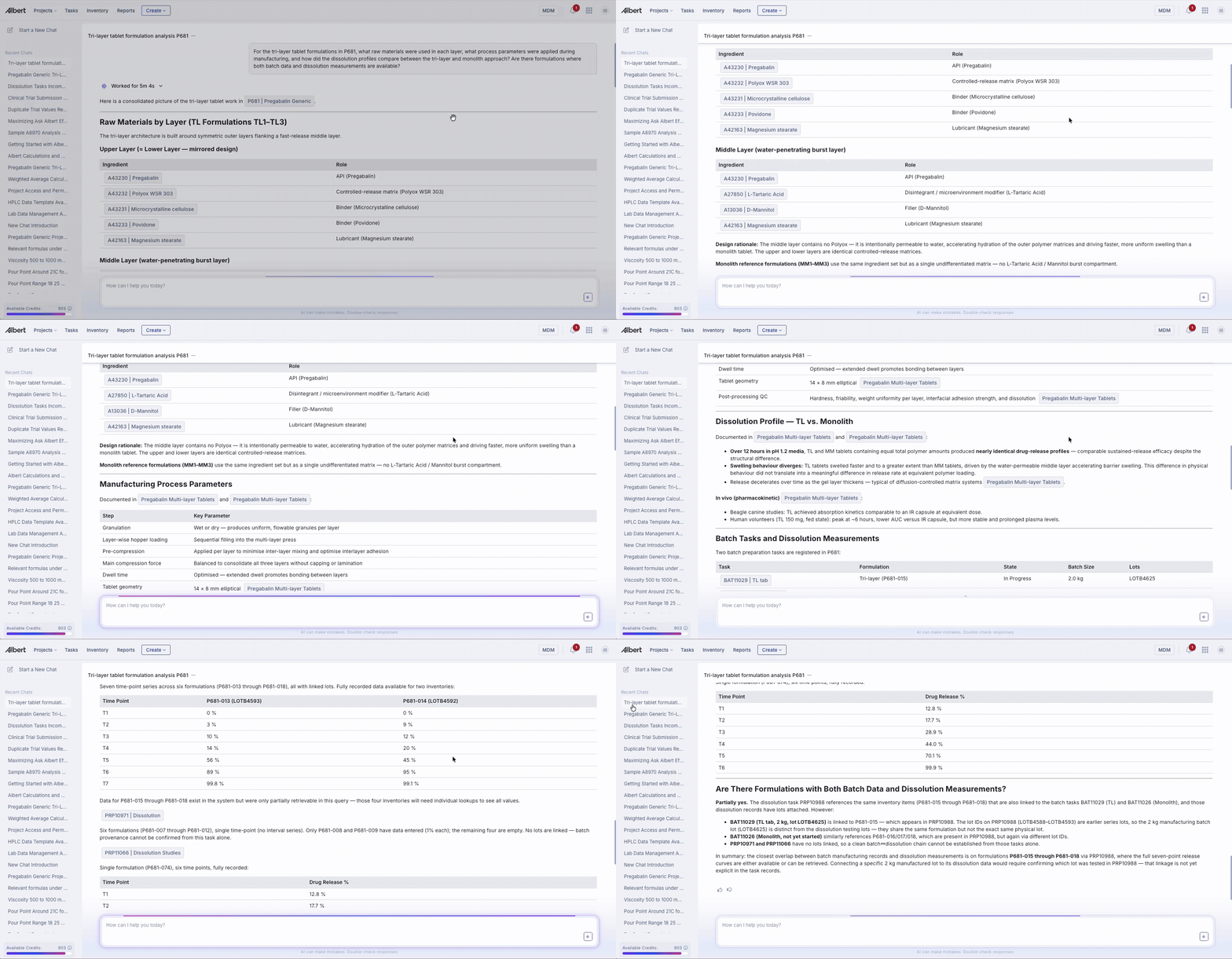
"For the tri-layer tablet formulations in P681, what raw materials were used in each layer, what process parameters were applied during manufacturing, and how did the dissolution profiles compare between the tri-layer and monolith approach? Are there formulations where both batch data and dissolution measurements are available?"
This single prompt draws from four sources at once:
Worksheets — layer-level composition
Batch Tasks — manufacturing parameters
Property Tasks — dissolution profiles across generations
Notebooks — mechanistic context and in vivo data
For property data specifically: combine the project ID and the inventory item in the same question. "What pour point measurements exist for LubeGuard 941 in the Oil and Gas project" narrows results significantly more than "any pour point data?" alone.
3. Recommendation-grade queries
Ask Albert can synthesize across data sources and give you a specific, reasoned recommendation — not just a list of results.
Three patterns that work:
Raw material substitution
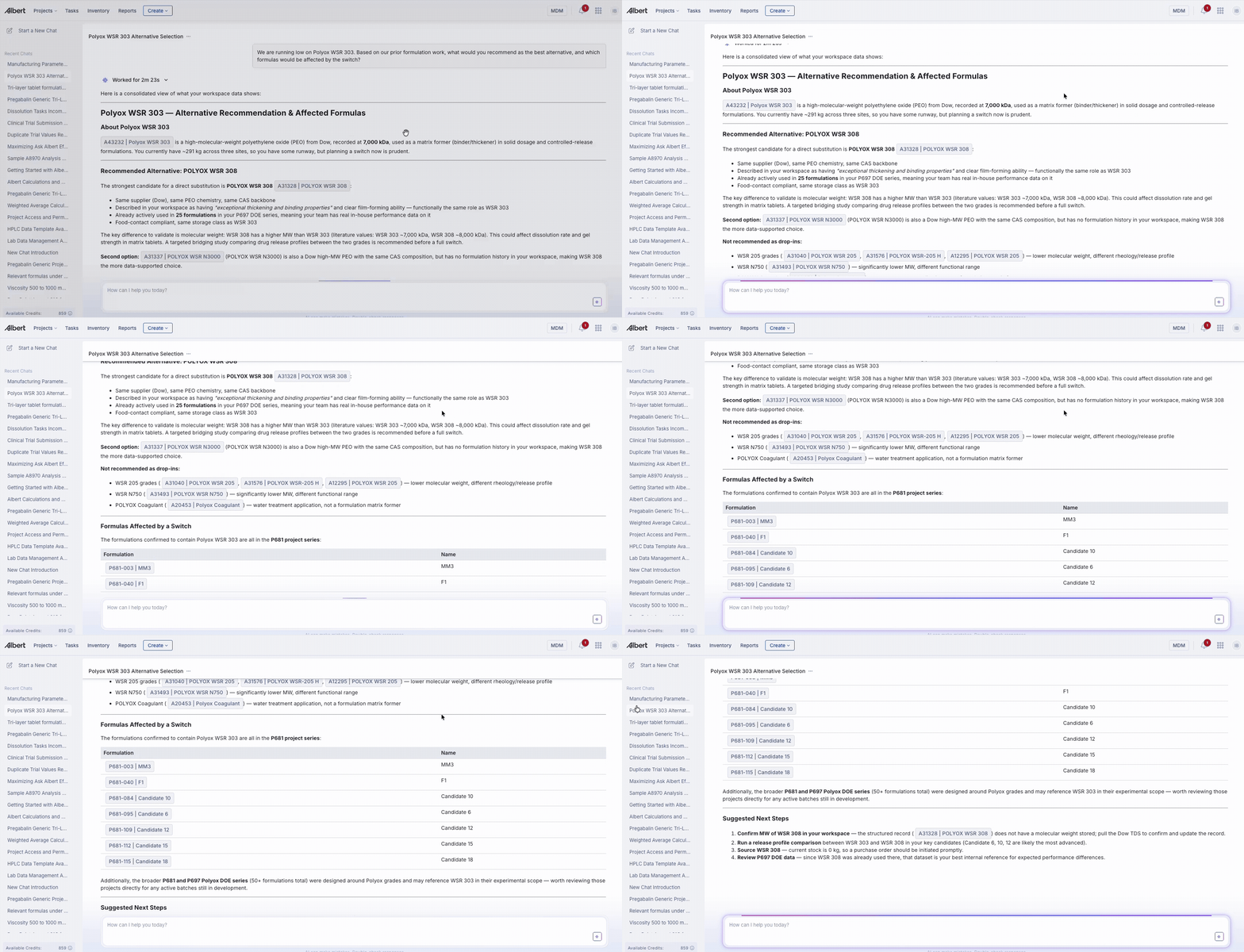
"We are running low on Polyox WSR 303. Based on our prior formulation work, what would you recommend as the best alternative, and which formulas would be affected by the switch?"
Ask Albert scans the full inventory for alternatives, checks which have existing stock, then looks for prior experimental data supporting the switch. In the Pregabalin Generic project, it identified that a 25-formulation DOE with the recommended alternative (WSR 308) had already been run inside the same project — meaning the substitution validation study already existed.
Process optimization
"Based on batch tasks and dissolution results in P681, is there a correlation between manufacturing process parameters and early drug release? What would you recommend changing to achieve below 10% burst at 0.25 hours?"
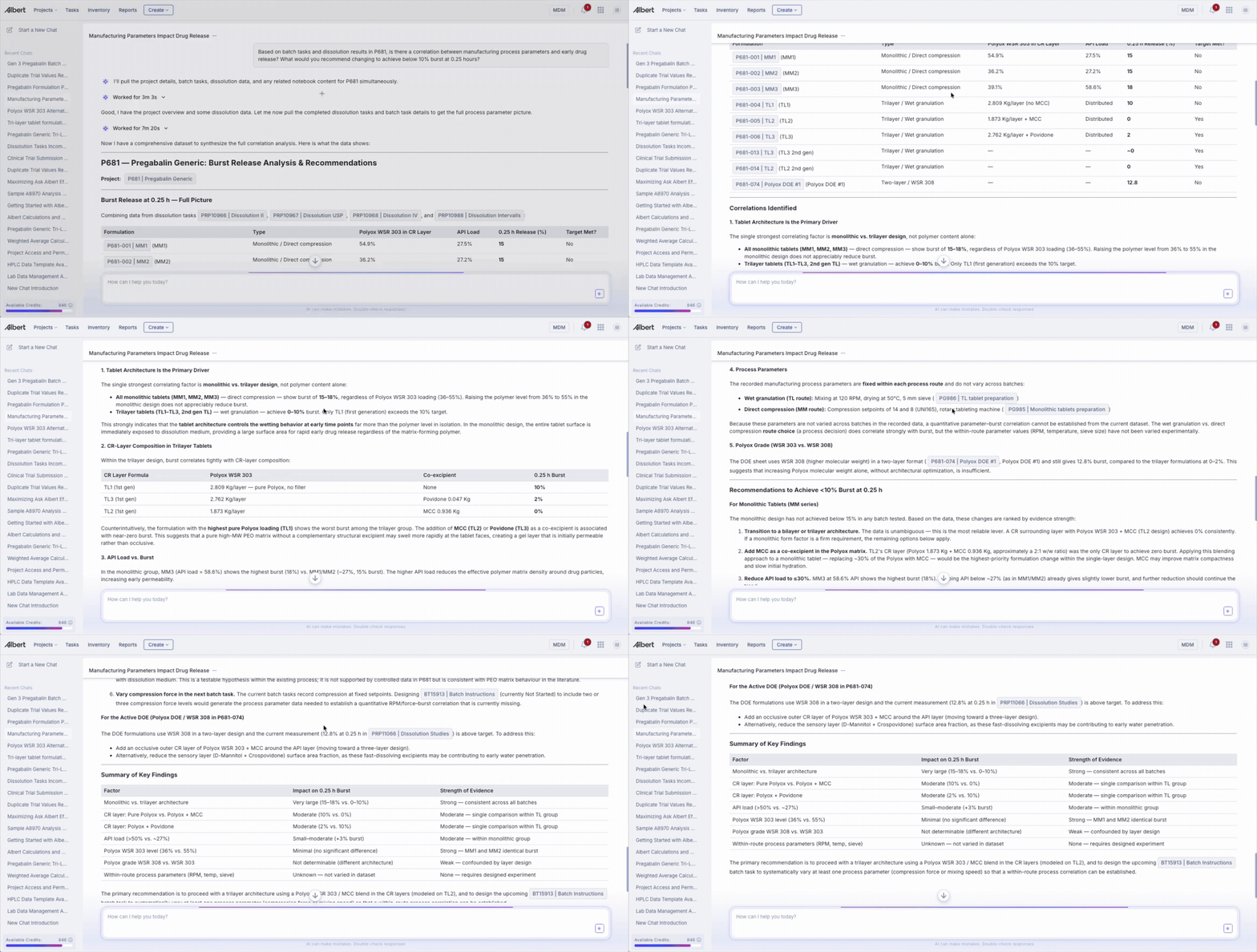
Note: Ask Albert will tell you honestly if the data needed to answer a question doesn't exist. In this case it found that compression force and dwell time were not recorded as measured values — and said so directly, then pivoted to the formulation signals that were in the data. That's the right behavior. A missing-data disclosure is more useful than a fabricated answer.
Go/no-go decision
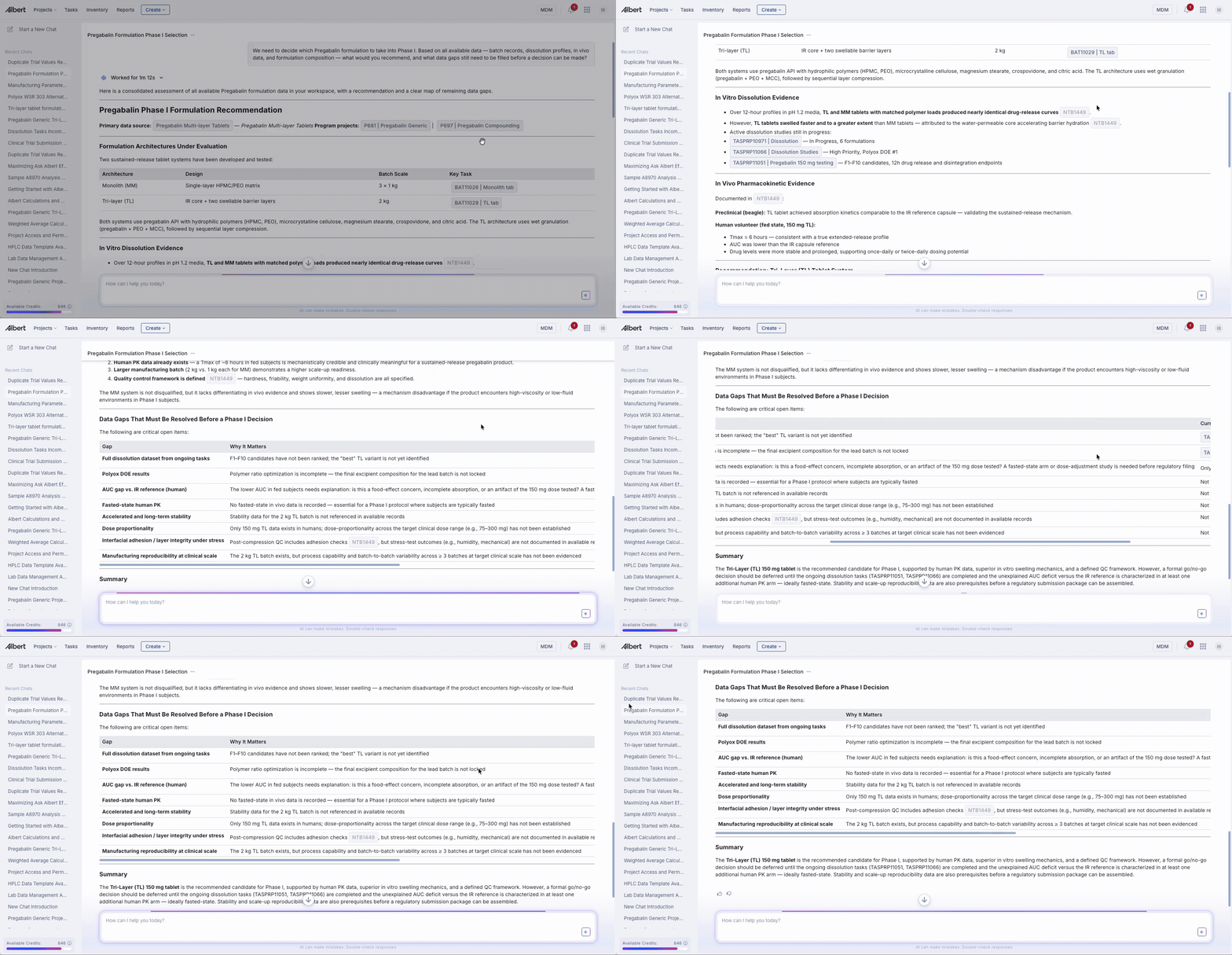
"We need to decide which Pregabalin formulation to take into Phase I. Based on all available data — batch records, dissolution profiles, in vivo data, and formulation composition — what would you recommend, and what data gaps still need to be filled before a decision can be made?"
Ask Albert returned: a specific candidate (TL2 Gen 3), the cumulative evidence base across three generations, eight data gaps that are hard IND blockers, and a sequenced action plan ordered by lead time. It also flagged a data integrity issue (a duplicate active trial) that had not been mentioned in the prompt.
Key principle for recommendation prompts: include the decision context — what the output will be used for, what constraints matter, what tradeoffs are acceptable. Ask Albert performs significantly better when it knows why you're asking.
4. Data quality workflows
Ask Albert can surface data integrity issues that are difficult to catch manually — duplicate trials, missing measurements, inconsistent states across tasks.
Pattern: Ask about a specific anomaly
"In task PT11051, F1 has a duplicate active trial — one shows 92.0% and another shows 92.1%. Which one is correct, and why does the system have two active values for the same trial?"
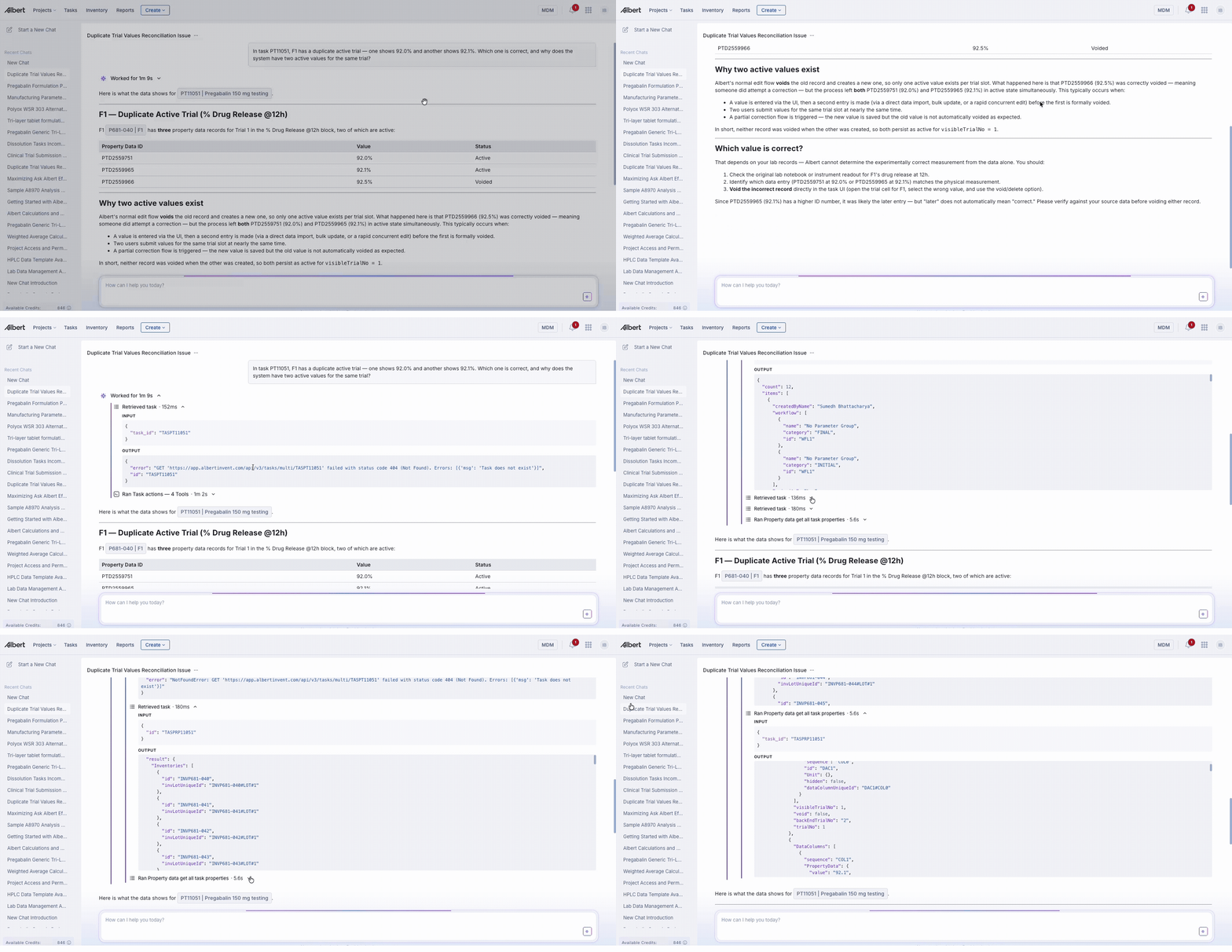
Ask Albert correctly identified:
The internal vs. visible trial number distinction
The likely sequence of events (entry → correction → missed void)
The specific PropertyData IDs to resolve (PTD2559751 and PTD2559965)
The responsible analyst to contact
That F2–F10 have no equivalent issues
It explicitly refused to guess which value is correct — that requires analyst confirmation.
Other useful data QC patterns:
"Are there any dissolution tasks in P681 where the same formulation has measurements in multiple generations — and do the values align?"
"Which batch tasks in P681 are marked Completed but have no linked property task data?"
"Are there inventory items in the Pregabalin project with no lot number assigned?"
5. Searching for what doesn't exist
Some of the most useful queries are ones designed to surface gaps — data that should exist but doesn't.
"Which Gen 3 Pregabalin formulations have a completed batch record but no dissolution data yet?"
"Are there any pour point measurements below 15°C for lubricant formulas?" — useful precisely when you expect the answer to be no, to confirm the absence.
"Do we have stability data for TL2 Gen 3 anywhere in our system?"

When Ask Albert returns no results, the reasoning block tells you whether it searched the right places. If it did and found nothing — that's a confirmed data gap, not a search failure.
6. When to rephrase
If a search returns fewer results than expected, try these adjustments before giving up:
Situation | What to try |
|---|---|
Range query returns nothing | Check units — your team may store the property in different units (e.g. Pa·s vs mPa·s) |
Brand name returns nothing | Rephrase around function: "surfactant for low-pH systems" instead of a trade name |
Too many irrelevant results | Add project ID and inventory item name together |
Correct concept, wrong results | Expand the reasoning block — check what Ask Albert searched |
Composition question returning formulas not ingredients | Ask "what raw materials are in project X" rather than searching for ingredients by description |