
Albert Breakthrough — What It Is & How to Use It
Breakthrough is a chemistry‑focused AI toolkit embedded in Albert. It predicts molecular properties, designs smart experiments with sparse data, and proposes formulation candidates aligned to your targets. As you run experiments and log results, Breakthrough learns and continuously improves its suggestions.
Overview
Use Breakthrough to accelerate formulation and molecular discovery with data‑driven suggestions that get better as you experiment.
Predict molecular properties directly from structures.
Generate candidate formulas tuned to your targets and constraints.
Plan high‑information experiments when data is sparse.
Learn continuously from results logged in Albert.
How to Access Breakthrough
Make sure prerequisites are met, then open Breakthrough from your Albert interface.
Before You Begin (Prerequisites)
Access: Ask your Albert Admin to enable Breakthrough under Manage People & Roles.
Historical data: Clean, labeled results from past experiments yield the best performance.
Defined objectives: Know what you’re optimizing—target properties, ranges, constraints.
Open Breakthrough
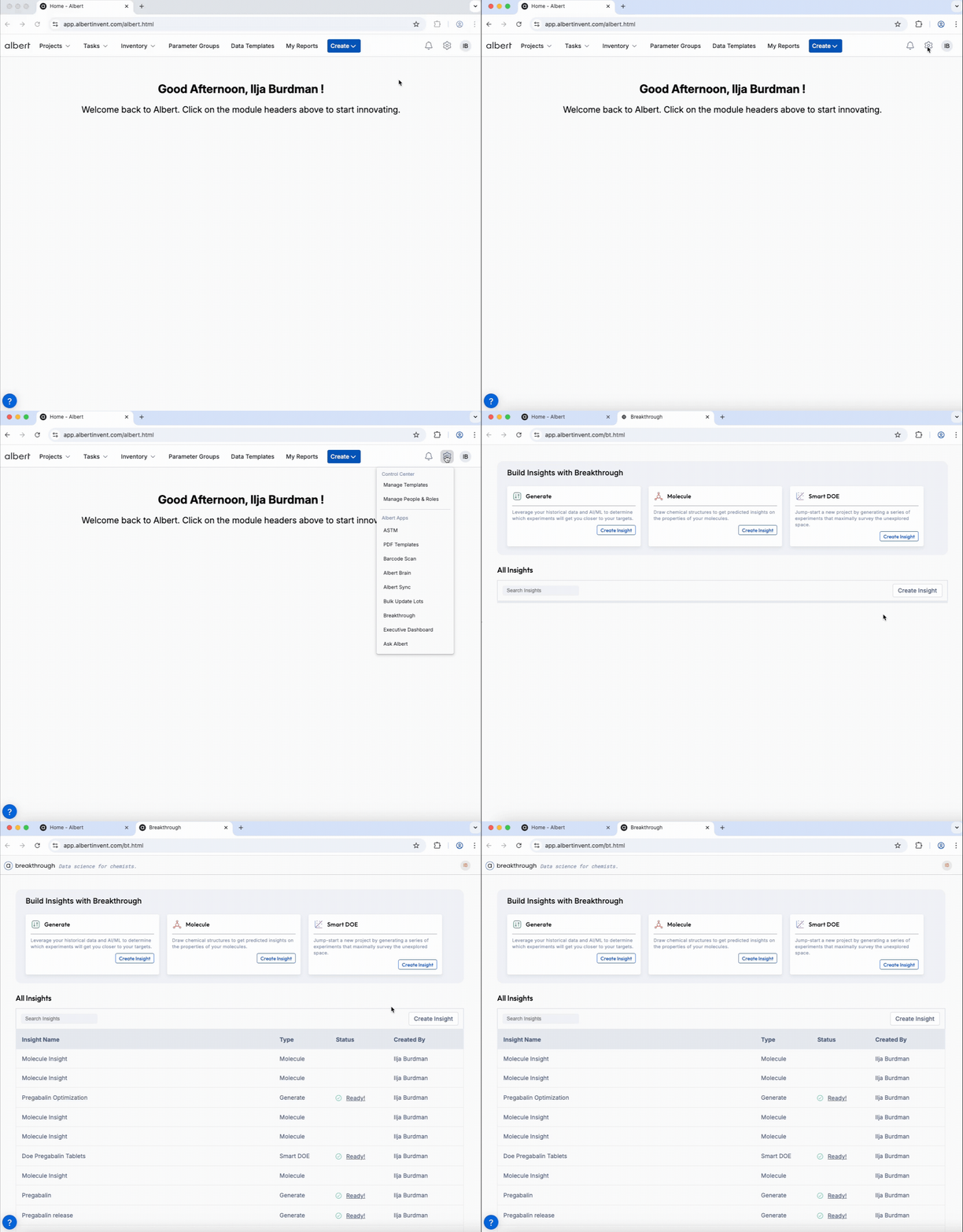
Click the gear icon in the top‑right of Albert.
Select Breakthrough. A new tab opens with access to three modules: Generate, Molecule, and Smart DOE.
Modules & When to Use Them
🧪 Generate | 🧬 Molecule | 📈 Smart DOE | |
|---|---|---|---|
Best For | Formulation discovery, Targeted optimization | Virtual screening, Early triage | Minimal data starts, Fast learning |
Inputs | Project/dataset, targets, ranges, constraints | Molecular structure, selected properties | Variables & ranges, objectives, constraints |
Outputs | Candidate formulas to push to your worksheet | Predicted properties & similar-structure insights | Experimental batch to run and log |
Workflow idea: Molecule → Smart DOE → Generate to explore, propose, and learn in cycles.
Core Concept: Constraints
Constraints guide generation and planning so suggestions are practical and aligned with your boundaries.
Target ranges (e.g., viscosity 500–800 cP).
Composition rules (include/exclude components, min/max loadings).
Operational boundaries (cost, safety, availability).
Good constraints are clear and realistic. Overly tight or conflicting rules may prevent candidate generation.
Step‑by‑Step Workflows
🧪 Generate — Formulation Discovery
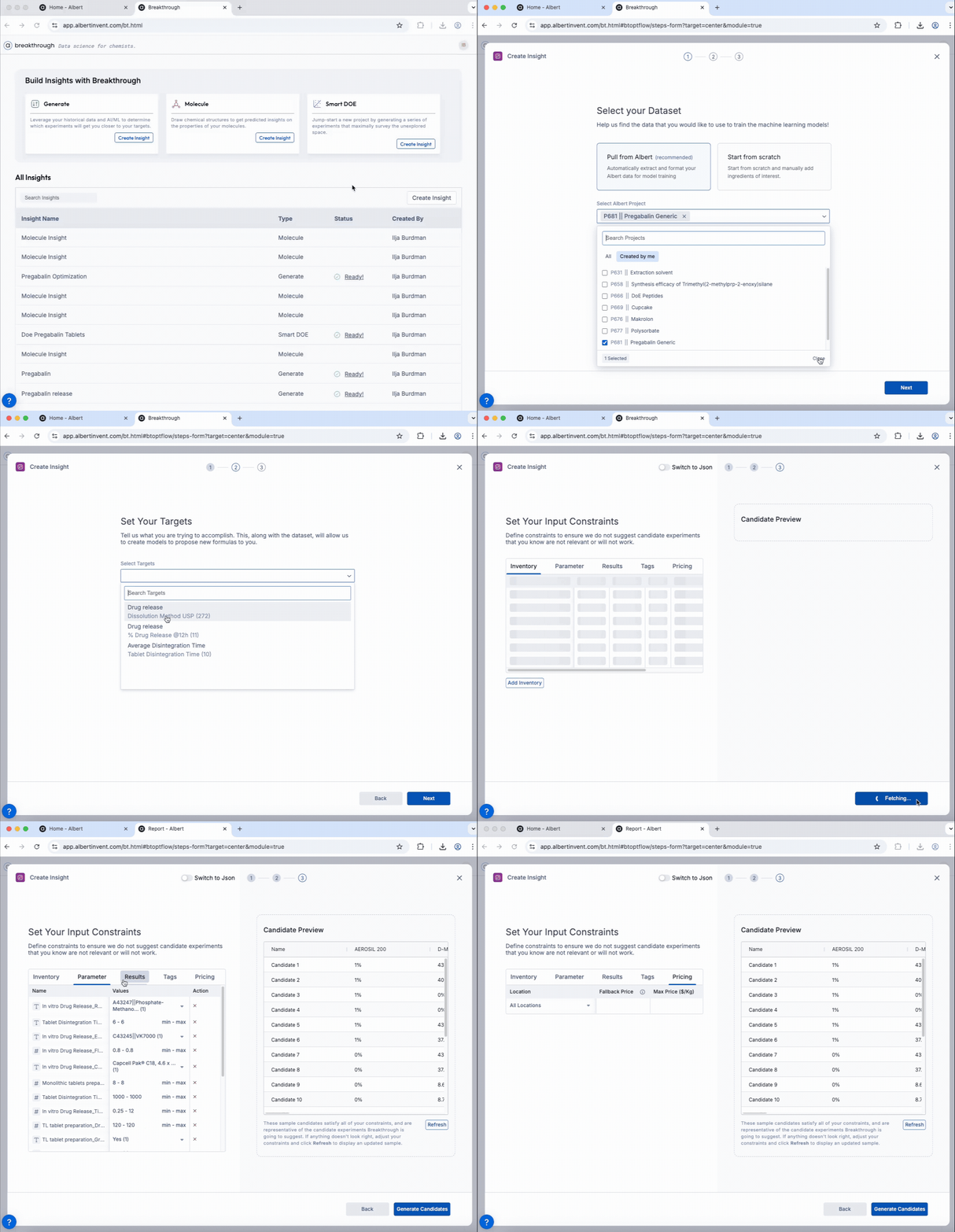
Open Generate.
Select your dataset or project.
Define target properties and ranges.
Apply constraints (composition, cost, availability, etc.).
Optional: adjust generation settings (e.g., candidate count).
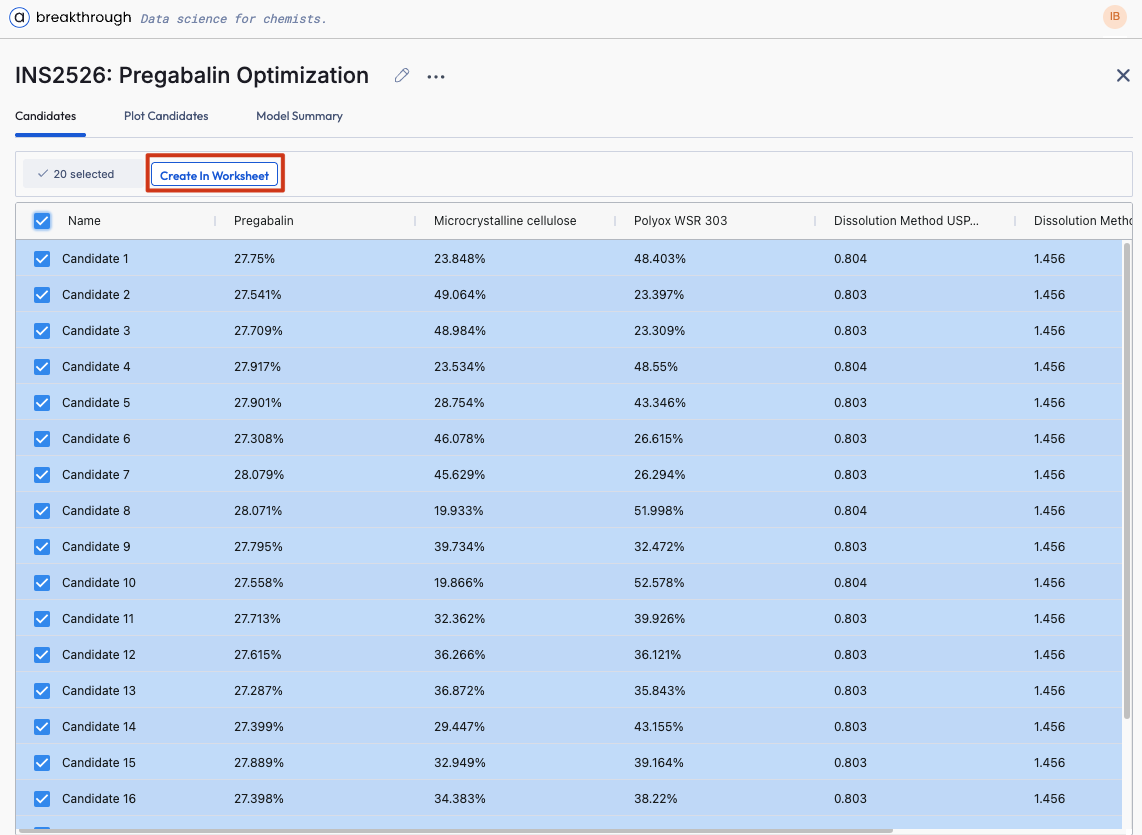
Generate and review candidates.
Push chosen candidates to your worksheet.
Execute experiments and log results — Breakthrough learns and evolves.
Strategy: Start broad, then refine as you learn more.
🧬 Molecule — Virtual Property Predictions
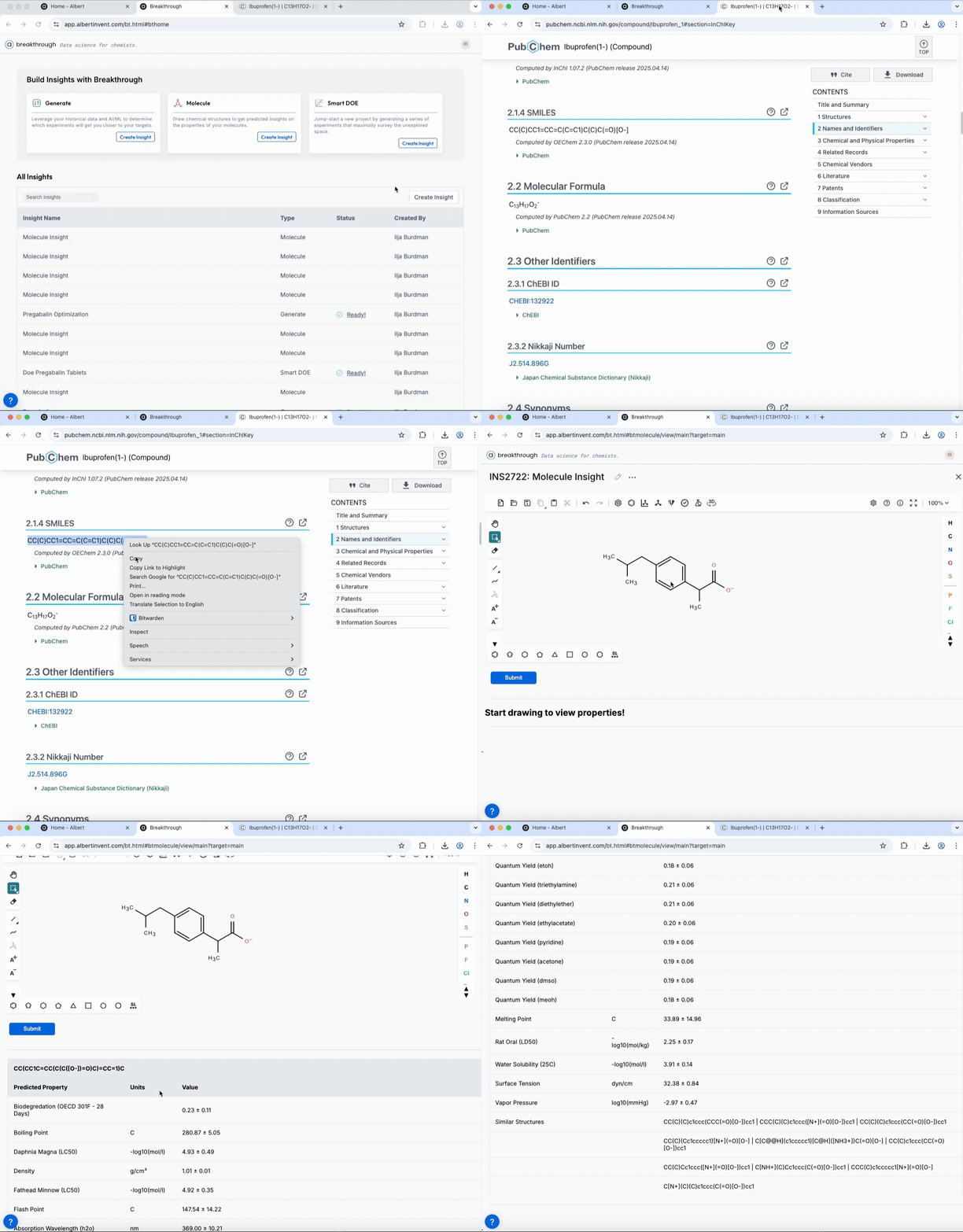
Open Molecule.
Input a structure (draw or paste SMILES).
Select properties to predict.
Review predictions and similar‑structure insights.
Use results to prioritize structures for synthesis or formulations.
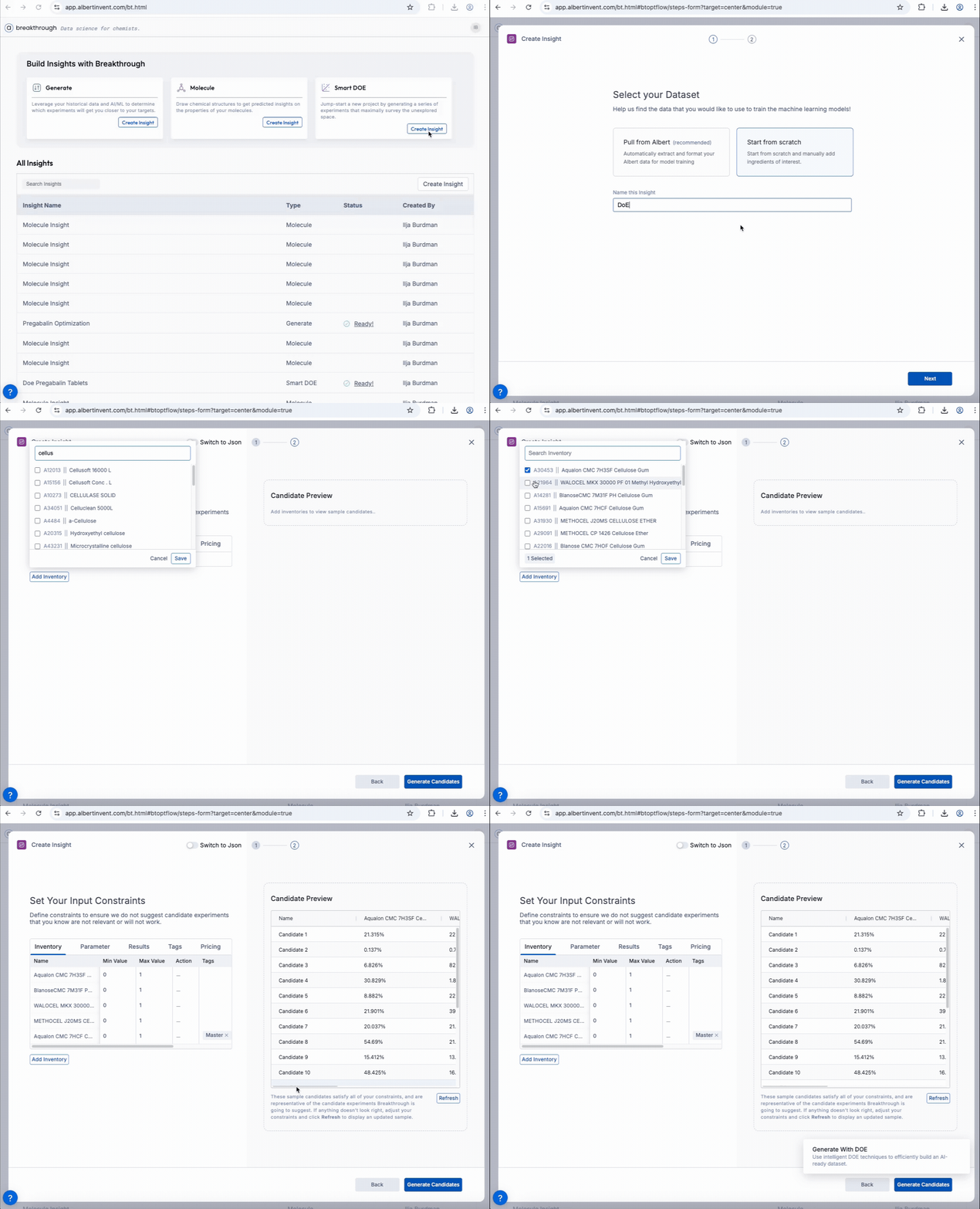
📈 Smart DOE — Active Learning from Limited Data
Open Smart DOE.
Define input variables and ranges.
Set optimization objectives.
Apply constraints.
Generate an experimental batch.
Transfer candidates to the worksheet.
Handling Intermediate Mixtures (Premixes)
Use premixes as design variables when they appear in historical, measured formulas.
Formulas added only via Add Inventory aren’t unpacked into raw materials by Breakthrough, so they’re unavailable for modeling.
When premixes exist in historical data, the system flattens them into raw‑material components for modeling—but keeps the premix as a nominal unit for constraint enforcement.
This ensures rules like “use exactly 30% premix P1” are strictly enforced even if component‑level exclusions would otherwise conflict.
Best Practices: Good vs. Bad Examples
Practice | Good Example | Bad Example |
|---|---|---|
Clean & Standardized Data | Raw data normalized (units consistent, labeled columns, no duplicates); easy to search and analyze. | Inconsistent formats, missing values, duplicates — hard to use or interpret. |
Define Realistic Targets | Goals based on product specs — e.g., viscosity 600–800 cP, with minimum tensile strength. | Arbitrary or vague — e.g., “make it better” or “maximize stability” without clear metrics. |
Balanced Constraints | Constraints guide discovery (cost < $5/kg, viscosity range, ingredient exclusions) — flexible but focused. | Overly tight or misaligned — require unavailable ingredients or too‑narrow ranges. |
Log All Experiment Outcomes | Every run logged in Albert (successes and failures); Breakthrough learns and improves. | Only successes tracked, or results recorded elsewhere — limited learning. |
Track Performance Improvements | Monitor cycle time and candidate quality — e.g., reduce development from months to days. | No metrics tracked — can’t see progress or quantify impact. |
Troubleshooting
Issue | Solution |
|---|---|
“No Access” error | Ask your Albert Admin to enable Breakthrough under Manage People & Roles. |
No candidates returned | Loosen constraints or broaden target ranges. Confirm your project has sufficient historical data in Albert. |
Unexpected behavior or errors | Contact Albert Support with details to investigate and resolve the issue. |
Questions or feedback? Contact support.