
Worksheet - Row Grouping
Welcome to the Worksheet! The Worksheet is packed with capabilities so you can manage and organize your data more effectively than ever before.
Row Grouping
Row Grouping allows you to cluster similar types of rows together to better organize your Worksheet.
When you group rows, it will turn all of the rows you select into child rows, and the parent row will be a new blank row that the children are grouped under. You can name the parent row anything you'd like.
To group rows together, select the checkboxes to the left of the items you want to group, then click the Group Rows icon that appears at the top of the screen.

After the rows are grouped together, the parent row has an expand and collapse caret on the left side of the cell, making it easy to expand and collapse the row group.

Add item(s) to an existing row group by clicking the six dots the the left of the item(s) and then dragging into the row group.
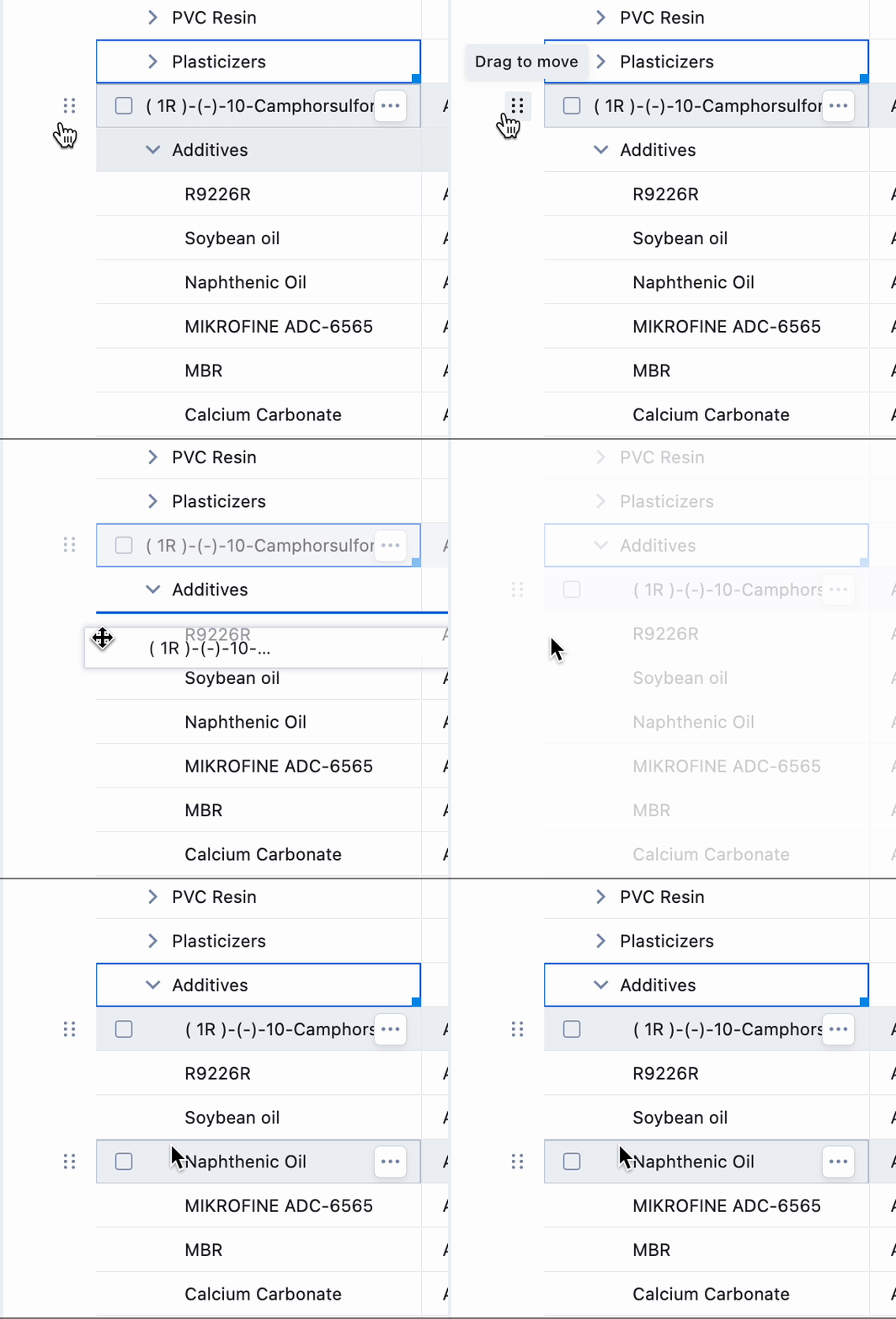
Remove an item by following the same process and dragging out of the row group.
Note: The row group must be expanded in order to add or remove item(s) via this method.
Row Grouping makes the Worksheet cleaner and allows for flexibility in viewing only the content you want to see on the screen.