
Access Roles and Policies in Albert
Roles determine which actions you can take across Albert. Each role is made up of policies — and each policy grants access to a specific area of the platform.
To view or manage roles, click your initials → Settings → Roles.
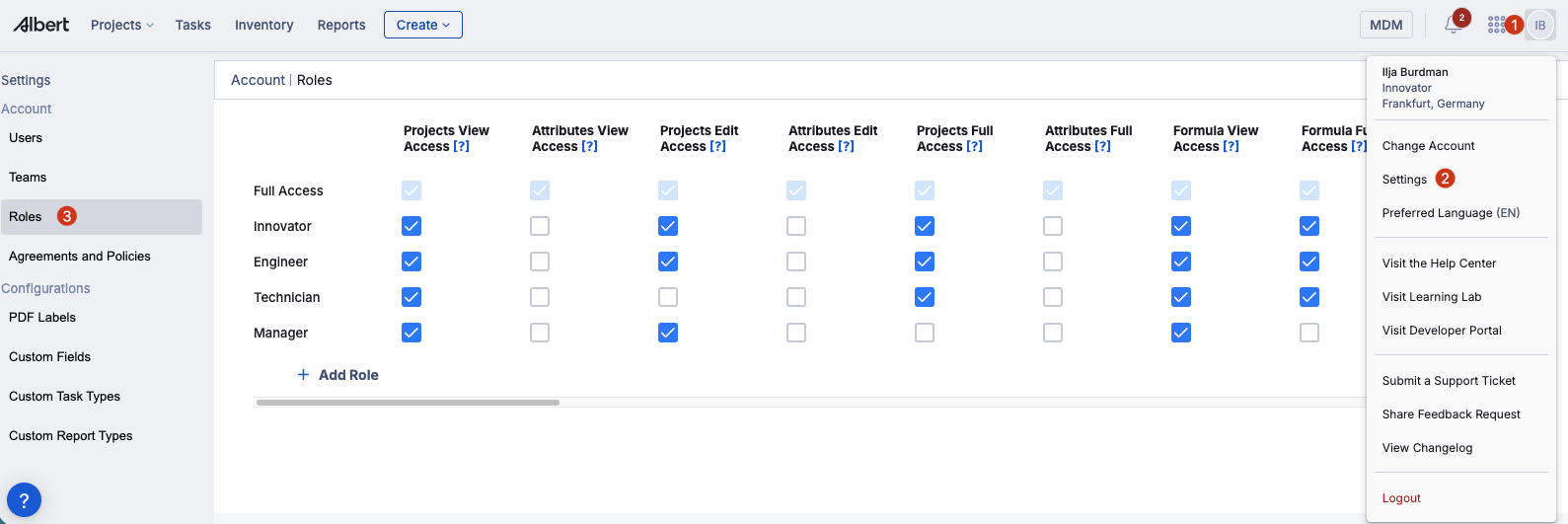
How policies work
Policies are the building blocks of roles. Most areas of Albert follow a tiered pattern: View Access gives you read-only visibility, Edit Access lets you view and modify existing records but not create new ones, and Full Access lets you create, view, edit, and delete. Not every area has all three tiers — some only have View and Full, and a few have only Full Access.
System Administrators can mix and match policies when creating custom roles, so each user gets exactly the access they need.
Default roles
Albert comes with five default roles. These are Full Access, Innovator, Technician, Engineer, and Manager.
See the Default Roles Table at the end of this article for a reference on default permissions.
Custom roles
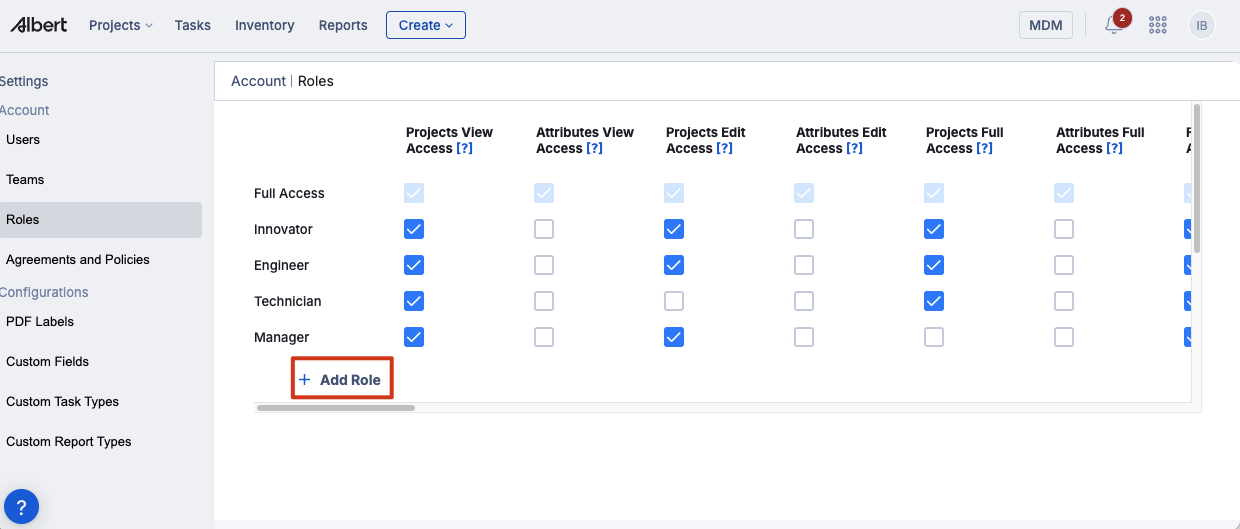
System Administrators can create custom roles by selecting any combination of policies. To create a custom role, click your initials → Settings → Roles, then add a new role and select the policies it should include.
Policy reference
Most areas of Albert follow a tiered pattern. Where multiple tiers exist, each higher tier includes everything from the tier below it.
Projects
Projects View Access — Ability to view projects. Includes searching and browsing projects, viewing notes and attachments, and opening and searching notebooks.
Projects Edit Access — Ability to view and edit projects, but not create new ones. Adds editing project details, managing notes/attachments/tags, and updating ACLs. Includes opening and searching notebooks.
Projects Full Access — Ability to view, edit, create, and delete projects. Adds full notebook and synthesis CRUD, block editing, and project lifecycle management (create, delete, reactivate).
Attributes
Attributes View Access — Ability to view attributes.
Attributes Edit Access — Ability to view and edit attributes, but not create new ones.
Attributes Full Access — Ability to view, edit, create, and delete attributes.
Formulas
Formula View Access — Ability to view formulas. Includes reading worksheets, product designs, property data, result grids, ABIs, predictions, and inventory references. Broad read access across formulation-related modules.
Formula Full Access — Ability to view, edit, and create formulas. Adds creating and editing worksheets, product designs, rows, columns, property data, ABIs, predictions, and block operations within notebooks.
Pricing
Pricing View Access — Ability to view pricing.
Pricing Full Access — Ability to view, edit, create, and delete pricing.
Tasks
Tasks View Access — Ability to view tasks. Includes reading tasks, workflows, batch data, property data, result grids, and related records. Also grants read access to notebooks, synthesis records, blocks, links, and witnesses.
Tasks Full Access — Ability to view, edit, create, and delete tasks. Adds full CRUD on tasks, workflows, batch data, property data, lots, notebooks, synthesis records, blocks, links, witnesses, notes, attachments, and tags.
Inventory
Inventory View Access — Ability to view all inventory. Includes browsing items, lots, CAS records, companies, storage locations, and generating reports/PDFs.
Inventory Edit Access — Ability to view and edit inventory, but not create new items. Adds modifying existing inventory items and lots, editing companies, updating storage locations, and managing tags/notes/attachments.
Inventory Full Access — Ability to view, edit, create, and delete inventory. Adds creating new items, deleting items, creating/deleting companies and storage locations, and merging records.
Inventory Full Access with update class — Ability to view, edit, create, and delete inventory, including the ability to change an item's object class. Identical to Inventory Full Access plus the ability to reclassify an item (e.g., from Shared to Restricted).
CAS
CAS Full Access — Ability to view, edit, create, and delete CAS records.
Parameter groups
Parameter Groups View Access — Ability to view all parameter groups.
Parameter Groups Edit Access — Ability to view and edit parameter groups, but not create new ones.
Parameter Groups Full Access — Ability to view, edit, create, and delete parameter groups.
Data templates
Data Templates View Access — Ability to view all data templates.
Data Templates Edit Access — Ability to view and edit data templates, but not create new ones.
Data Templates Full Access — Ability to view, edit, create, and delete data templates.
Reports
Reports View Access — Ability to view all reports.
Reports Full Access — Ability to view, edit, create, and delete reports.
People and teams
People Edit Access — Ability to view and edit users, but not create new ones.
People Full Access — Ability to view, edit, create, and delete users.
Team Edit Access — Ability to view and edit teams, but not create new ones.
Team Full Access — Ability to view, edit, create, and deactivate teams.
Administration
Access Roles Full Access — Ability to view, edit, and create roles and policies.
Audit Access — Ability to access all user activities.
Templates and lists
Templates View Access — Ability to view templates.
Templates Full Access — Ability to create, view, edit, and delete templates.
User Managed Lists Full Access — Ability to view, edit, create, and delete user-managed lists.
Company Managed Lists Full Access — Ability to view, edit, create, and delete company-managed lists.
Other
Locations Full Access — Ability to view, edit, create, and delete locations.
SDS Full Access — Ability to view, create, and download safety data sheets.
Unit Full Access — Ability to view, edit, create, and delete units.
Breakthrough Full Access — Ability to view, edit, create, and delete Breakthrough insights and datasets. When a Breakthrough insight is linked to a project via the "Link to project" option, the insight inherits the parent project's ACL, controlling which users can see it based on their project access.
Smart Projects Full Access — Ability to view, edit, create, and delete Smart Projects.
Default Roles Table:
The table below shows the access policies for each Albert default role.
Policy | Full Access | Innovator | Technician | Engineer | Manager |
|---|---|---|---|---|---|
Projects View Access | ✓ | ✓ | ✓ | ✓ | ✓ |
Projects Edit Access | ✓ | ✓ | — | ✓ | — |
Projects Full Access | ✓ | — | — | ✓ | ✓ |
Attributes View Access | ✓ | — | — | — | — |
Attributes Edit Access | ✓ | — | — | — | — |
Attributes Full Access | ✓ | — | — | — | — |
Formula View Access | ✓ | ✓ | ✓ | ✓ | ✓ |
Formula Full Access | ✓ | ✓ | ✓ | ✓ | — |
Pricing View Access | ✓ | ✓ | ✓ | ✓ | — |
Pricing Full Access | ✓ | ✓ | ✓ | ✓ | ✓ |
Tasks View Access | ✓ | ✓ | ✓ | ✓ | ✓ |
Tasks Full Access | ✓ | ✓ | ✓ | ✓ | ✓ |
Inventory View Access | ✓ | ✓ | ✓ | ✓ | ✓ |
Inventory Edit Access | ✓ | — | — | — | ✓ |
Inventory Full Access | ✓ | ✓ | — | ✓ | ✓ |
Inventory Full Access with update class | ✓ | — | — | — | — |
CAS Full Access | ✓ | ✓ | ✓ | ✓ | ✓ |
Parameter Groups View Access | ✓ | ✓ | ✓ | ✓ | ✓ |
Parameter Groups Edit Access | ✓ | ✓ | — | ✓ | ✓ |
Parameter Groups Full Access | ✓ | — | — | ✓ | — |
Data Templates View Access | ✓ | ✓ | ✓ | ✓ | ✓ |
Data Templates Edit Access | ✓ | ✓ | — | ✓ | ✓ |
Data Templates Full Access | ✓ | — | — | ✓ | — |
Reports View Access | ✓ | ✓ | ✓ | ✓ | ✓ |
Reports Full Access | ✓ | ✓ | ✓ | ✓ | ✓ |
Templates View Access | ✓ | ✓ | ✓ | ✓ | ✓ |
Templates Full Access | ✓ | — | — | — | — |
User Managed Lists Full Access | ✓ | ✓ | ✓ | ✓ | ✓ |
Company Managed Lists Full Access | ✓ | ✓ | ✓ | ✓ | ✓ |
Unit Full Access | ✓ | ✓ | ✓ | ✓ | ✓ |
Locations Full Access | ✓ | — | — | — | — |
SDS Full Access | ✓ | ✓ | ✓ | ✓ | — |
People Edit Access | ✓ | — | — | — | — |
People Full Access | ✓ | — | — | — | — |
Team Edit Access | ✓ | — | — | — | — |
Team Full Access | ✓ | — | — | — | — |
Access Roles Full Access | ✓ | — | — | — | — |
Audit Access | ✓ | — | — | — | — |
Breakthrough Full Access | ✓ | — | — | — | — |
Smart Projects Full Access | ✓ | — | — | — | — |